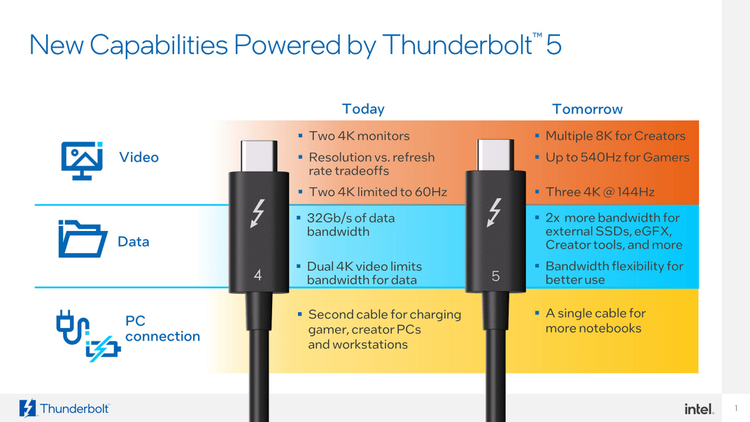
Thunderbolt 5 is here. Intel's latest upgrade to its all-in-one connectivity standard. Promising up to 120 Gbps bandwidth, 240W charging, and support for 8K displays, it's a serious step forward.
But what does that really mean for you? Let's break down what's new, who it is for, and whether it's worth upgrading.
What is Thunderbolt?
For years, Intel has promised a simpler future with one universal connection for data, video, and power. Thunderbolt aimed to be that all-in-one solution, and while it's made impressive progress, widespread adoption has beed slower than hoped.
Co-designed with Apple, the first Thunderbolt standard launched in 2011, and since then, it has powered everything from professional docks to high-end laptops. Today, all modern MacBooks and many Windows ultrabooks include Thunderbolt ports — but confusion with USB-C remains common.
Thunderbolt 5: Key Specs at a Glance
- Up to 80 Gbps bidirectional bandwidth (40 Gbps more than TB4) or 120 Gbps outbound
- Up to 240W charging
- Support for multiple 8K displays (with DSC)
- 480 Hz 1080p gaming
- Daisy-chain up to 5 devices
USB-C vs Thunderbolt: What's the Difference?
Many people assume USB-C and Thunderbolt are the same since both use the same connector. But while all Thunderbolt ports use USB-C, not all USB-C ports support Thunderbolt. The difference lies in speed, compatibility, and cost.
Here's how they compare:
| Feature | USB-C (USB4) | Thunderbolt 5 |
|---|---|---|
| Max Bandwidth | Up to 40 Gbps | Up to 120 Gbps |
| Power Delivery | Up to 240W | Up to 240W |
| Display Support | Up to 8K (Alt Mode) | Up to 8K with DSC |
| Daisy Chaining | Limited | Up to 5 devices |
| Typical Cost | Lower | Higher |
While the performance gap is clear, the real-world benefit depends on your use case. For most users, USB-C’s versatility is already enough for charging, connecting a monitor, or transferring files.
Who is Thunderbolt 5 for?
If you need Thunderbolt 5, you probably already know it. This standard has always targeted power users, creators, developer, and professionals who move large files or run multiple high-resolution displays.
For everyone else, HDMI, DisplayPort, or USB-C are more than enough for daily use. Thunderbolt devices and certified cables are still expensive, which limits their appeal to niche users.
Should You Upgrade?
Unless your workflow depends on ultra-fast external storage, high-refresh 8K monitors, or multi-device daisy chaining, you can safely skip Thunderbolt 5 for now.
It’s an exciting step forward for the ecosystem, but for most people, it won’t make a noticeable difference in daily use.
Conclusion
Thunderbolt has always been a powerful but niche technology. Despite Intel and Apple's dedication, cost remains the biggest barrier to mainstream adoption. If prices drop, Thunderbolt could finally become the universal standard it was meant to be.
Until then, most people will do just fine with the cables they already have.
Need help finding the right one?
Try the CableFinder app to easily find the right cable to make the most out of your setup.